> For the complete documentation index, see [llms.txt](https://docs.apica.io/llms.txt). Markdown versions of documentation pages are available by appending `.md` to page URLs; this page is available as [Markdown](https://docs.apica.io/data-management/overview-1/visualizations/funnel.md).
# Funnel
A funnel chart shows how a metric changes across ordered steps. Use it to measure drop-off, progression, or stability between stages.
A funnel chart shows how a single numeric metric changes across an ordered sequence of steps. Use it to compare stages and measure drop-off, growth, or stability.
It’s ideal for:
* conversion or pipeline steps
* request flows and stage transitions
* resource consumption stages
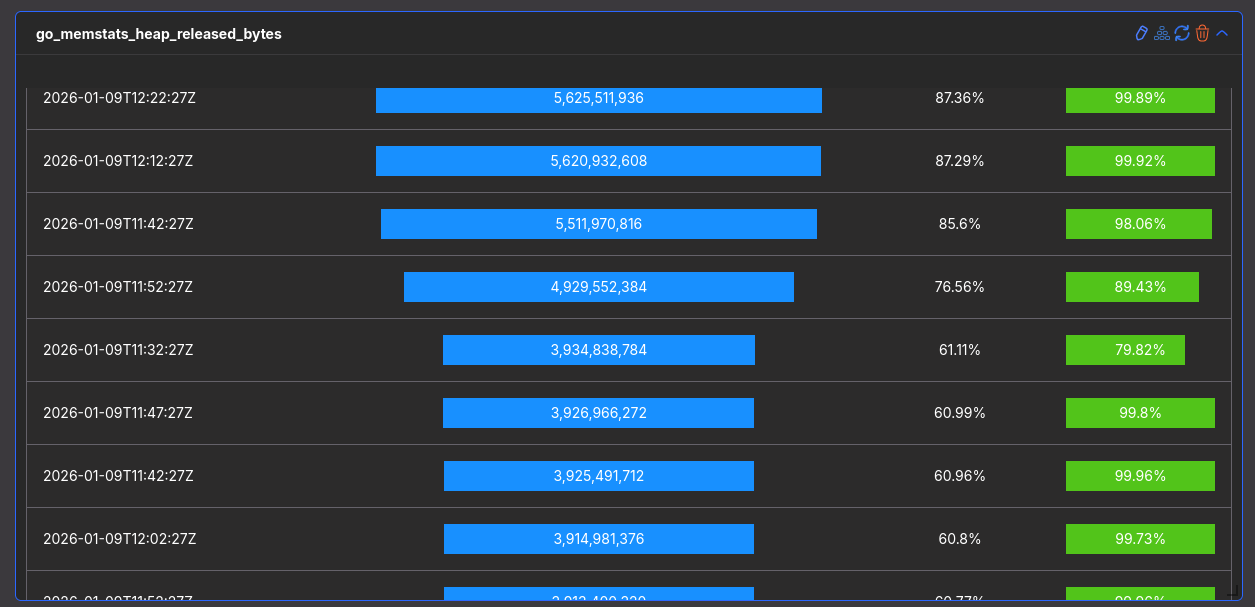
* stability checks over time (step = timestamp)
### What a funnel chart represents
Each row in the funnel represents one **step** (for example, time, stage, or state).
For each step, the funnel typically shows:
* **Step**: the stage or time
* **Value**: the numeric metric
* **% Max**: value relative to the highest step
* **% Previous**: value relative to the previous step
Sunburst chart
### Configure a funnel chart
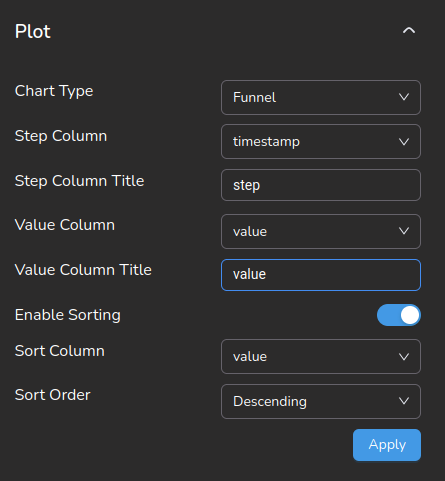
Use the **Plot** panel to choose the step column, value column, and sorting.
### Funnel chart options
Use these options to control how the funnel chart renders.
| Option | Purpose | Typical values / notes |
| ------------------ | ---------------------------------- | -------------------------------------------------------------------------------------------- |
| Step column | Defines what each step represents. | Common: `timestamp`. Other examples: `stage`, `status`, `pipeline_step`, `deployment_phase`. |
| Step column title | Display name for the step column. | Example: `step`. Cosmetic only. |
| Value column | Metric to compare across steps. | Must be numeric. Examples: `value`, `memory_bytes`, `request_count`. |
| Value column title | Display name for the value column. | Example: `value`. Cosmetic only. |
| Enable sorting | Sort steps before rendering. | Useful for “top drop-offs” or “largest values first”. |
| Sort column | Field used for sorting. | Often the same as Value column (for example `value`). |
| Sort order | Sorting direction. | `Ascending` or `Descending`. |
| Apply | Applies changes to the widget. | Changes do not render until you click **Apply**. |
{% hint style="info" %}
Key rules: Step column can be time or stage, Value column must be numeric, and sorting controls the funnel order. `% Max` shows relative scale, and `% Previous` shows step-to-step change.
{% endhint %}
### When to use funnel charts
Use funnel charts when you want to:
* track progression
* compare stages
* detect drop-offs
* measure stability