> For the complete documentation index, see [llms.txt](https://docs.apica.io/llms.txt). Markdown versions of documentation pages are available by appending `.md` to page URLs; this page is available as [Markdown](https://docs.apica.io/flow/list-of-forwarders/splunk-forwarding/apica-uf-proxy-app-extension.md).
# Apica Forwarder Proxy Source Extension
Apica's plugins include creating one or more Splunk Output configurations that can then be used to send data to Splunk. We support all the enterprise modes for forwarding, including sending data to a Standalone Server, a list of indexers, and sending data to indexers using Peer discovery.
## Architecture
Splunk S2F Forwarding architecture
### Required components
Follow the steps below to create an S2F forwarder to a Splunk indexer:
1. Create a `Splunk Forwarding Proxy` `Source Extension`.
2. Create a `forwarder` to use the Splunk Forwarding Proxy `source extension` created in step 1 above:
* One or more forwarders can be created to use the same Splunk Forwarding Proxy Source Extension
* Forwarders can be of type *`_json` or `_metric`*
* *`_metric`* type can forward to a Splunk metric index.
* `_json` can forward to a Splunk standard index.
### Creating Splunk UF proxy source extension (Forwarding Proxy)
The Splunk plugin for output configurations can be launched from the `Source Extensions` section under `Integrations`.
Selecting the `Forwarding Proxy` source extension gives you the configured proxies as well as the ability to create a new one.
List of configured Splunk Forwarding Proxies
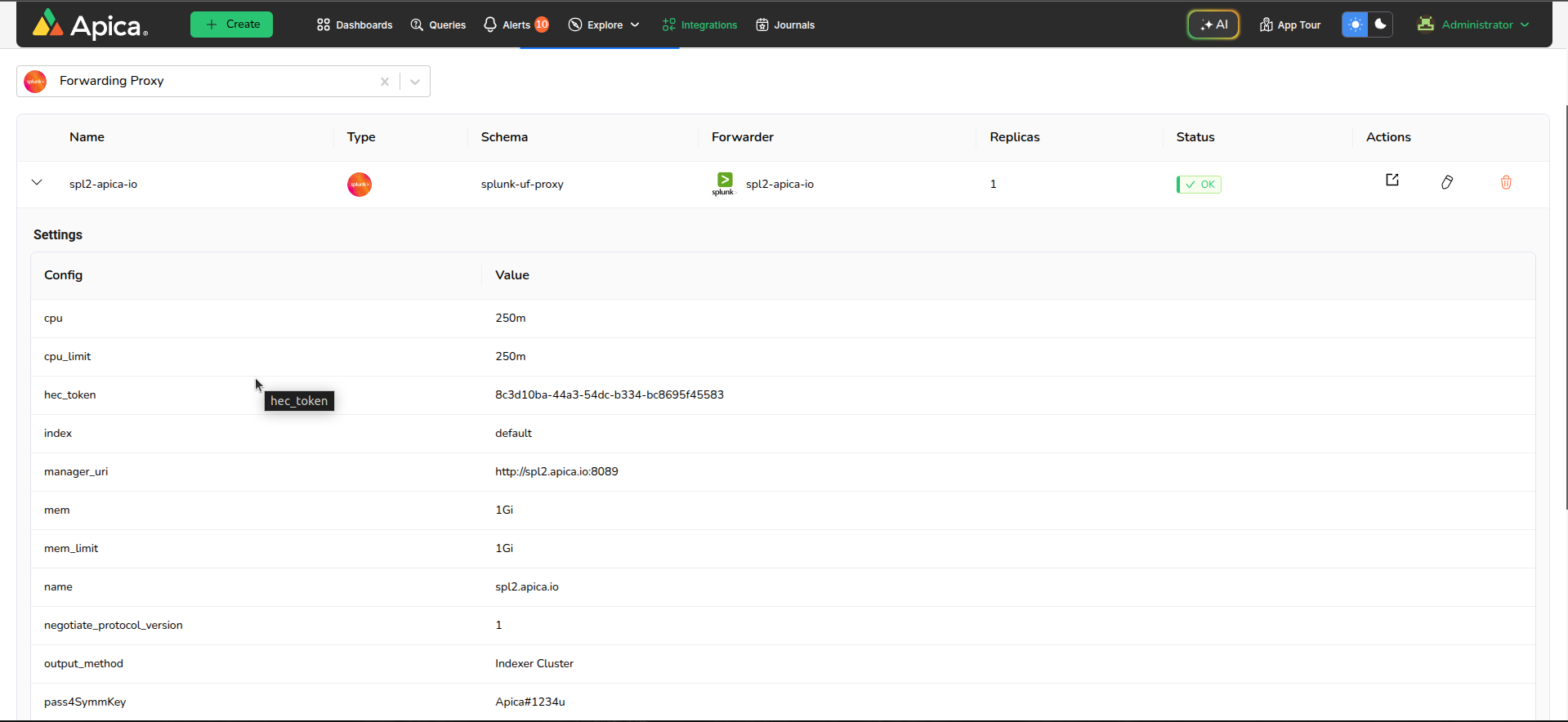
You can expand on the proxy to see its settings. The `hec_token` can be used to setup the `forwarder`.
Proxy Settings upon expanding
Note that a HEC forwarder is automatically created alongside the source extension. This forwarder is set up to send logs to the source extension. To use this source extension for forwarding, users need to manually map this forwarder to the required data flow.
The UF Proxy app extension allows connectivity to a Splunk indexer using a variety of supported options, such as a standalone indexer, a list of indexers, or using indexer cluster auto discovery.
Please refer to the guides below on how to configure each of these options
1. [Standalone Indexer](/flow/list-of-forwarders/splunk-forwarding/apica-uf-proxy-app-extension/standalone-instance.md)
2. [List of Indexer Instances](/flow/list-of-forwarders/splunk-forwarding/apica-uf-proxy-app-extension/list-of-indexer-instances.md)
3. [Indexer Cluster Auto-discovery](/flow/list-of-forwarders/splunk-forwarding/apica-uf-proxy-app-extension/indexer-discovery.md)
Note: The Splunk Forwarder Proxy Source Extension also provides an option to upload the `outputs.conf` and the `server.conf` with the [Upload Confs](/flow/list-of-forwarders/splunk-forwarding/apica-uf-proxy-app-extension/upload-confs.md).
.svg?alt=media&token=26613747-1e3a-4312-ac7d-48c9e4d734c2)