> For the complete documentation index, see [llms.txt](https://docs.apica.io/llms.txt). Markdown versions of documentation pages are available by appending `.md` to page URLs; this page is available as [Markdown](https://docs.apica.io/getting-started/ascent/getting-started-with-logs/opentelemetry.md).
# Collect Logs with OpenTelemetry
A guide on how to collect logs using OpenTelemetry on Linux from installation to ingestion
## Install otelcol-contrib
{% hint style="info" %}
At the time of writing, the latest version of otelcol-contrib is v0.121.0
See [releases](https://github.com/open-telemetry/opentelemetry-collector-releases/releases) for later versions
{% endhint %}
**For DEB-based:**
```
dpkg -i otelcol-contrib_0.121.0_linux_amd64.deb
```
**For RHEL-based:**
```
wget https://github.com/open-telemetry/opentelemetry-collector-releases/releases/download/v0.121.0/otelcol-contrib_0.121.0_linux_amd64.rpm
```
```
rpm -ivh otelcol-contrib_0.121.0_linux_amd64.rpm
```
## Configure Collector
Edit `/etc/otelcol-contrib/config.yaml` and replace the content with the below
```yaml
receivers:
filelog:
include: [""]
multiline:
line_start_pattern: '^\d{4}-\d{2}-\d{2} \d{2}:\d{2}:\d{2},\d{3}'
processors:
batch:
timeout: 5s
exporters:
debug:
verbosity: detailed
otlphttp:
logs_endpoint: https:///v1/json_batch/otlplogs?namespace=&application=
encoding: json
compression: gzip
headers:
Authorization: "Bearer "
tls:
insecure: false
insecure_skip_verify: true
service:
pipelines:
logs:
receivers: [filelog]
processors: [batch]
exporters: [debug, otlphttp]
```
Replace the following values:
* **\**
* Physical path to your log file
* **\**
* Hostname of your Apica environment (example.apica.io)
* **\**
* Your ingest token, see [how to obtain your ingest token](https://docs.apica.io/integrations/overview/generating-a-secure-ingest-token#obtaining-an-ingest-token-using-ui)
* **\**
* A name for high-level grouping of logs, isolating different projects, environments, or teams.
* **\**
* A name for logs generated by a specific service or process
* **line\_start\_pattern**
* The above example uses a regex to match on the timestamp of a log entry to capture the entire entry. This needs to be adjusted to match the beginning of your log structure. See below example of entries that matches this pattern.
```
2000-00-00 00:00:00,000 INFO [xxx] process1: message
2000-00-00 00:00:00,000 INFO [xxx] process2: message
2000-00-00 00:00:00,000 ERROR [xxx] process3: Exception: xyz
java.lang.xxx: message
at java.base
at java.base
at java.base
at java.base
at java.base
at java.base
at java.base
#### The entire stack trace will be captured as a single entry, based on the line_start_pattern
```
## Validate and apply
When you're done with your edits, execute the below command to validate the config is valid (it should return nothing if everything is in order)
```
otelcol-contrib validate --config=/etc/otelcol-contrib/config.yaml
```
Restart OTel to apply your changes
```
systemctl restart otelcol-contrib
```
## Ascent view
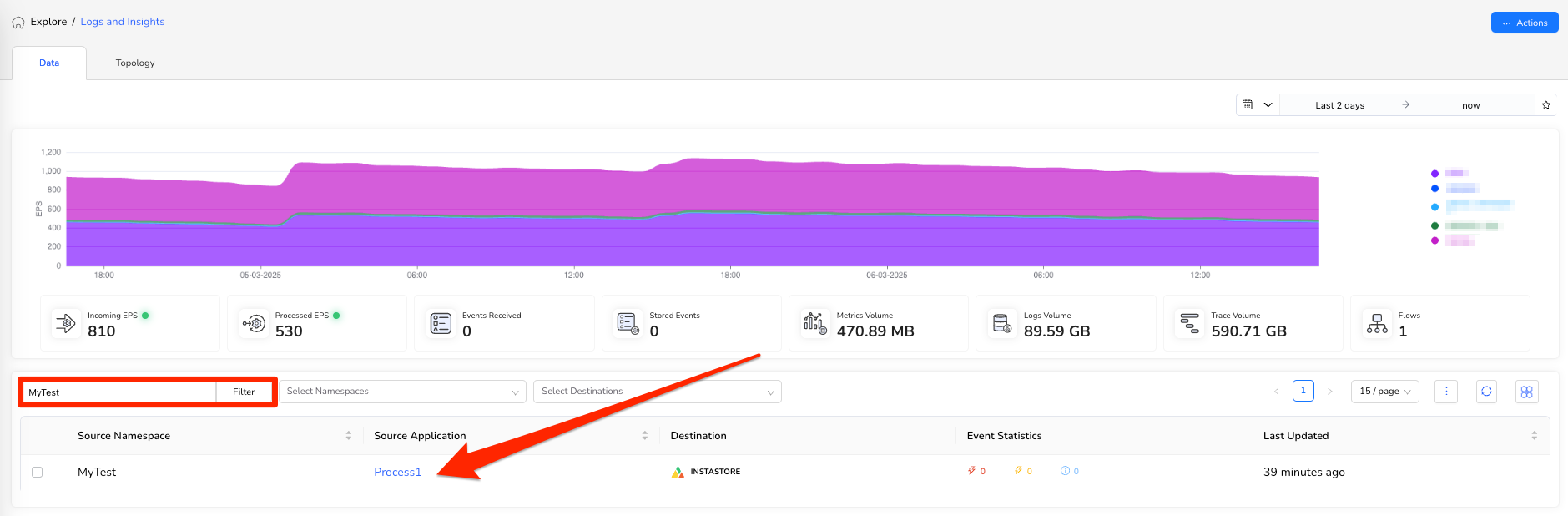
Assuming everything has been done correctly, your logs will start to appear in Explore > Logs & Insight on your Ascent environment. They will show up based on the namespace and application names that you set in your config.yaml file.