# ilert

## In ilert: Create an Apica alert source <a href="#in-ilert-create-a-apica-alert-source" id="in-ilert-create-a-apica-alert-source"></a>

1. Go to **Alert sources** -> **Alert sources** and click **Create new alert source**.

   <figure><img src="https://docs.ilert.com/~gitbook/image?url=https%3A%2F%2F3394882078-files.gitbook.io%2F%7E%2Ffiles%2Fv0%2Fb%2Fgitbook-x-prod.appspot.com%2Fo%2Fspaces%252F-M76ygPnS4HUcFSX8ulm%252Fuploads%252FjX0cS4q7woTXKajZmc1W%252FScreenshot%25202023-08-28%2520at%252010.21.10.png%3Falt%3Dmedia%26token%3D8ef3666b-84eb-4b51-abee-f07303313941&#x26;width=768&#x26;dpr=4&#x26;quality=100&#x26;sign=3981b130&#x26;sv=2" alt=""><figcaption></figcaption></figure>
2. Search for **Apica** in the search field, click the Apica tile, and then **Next**.

   <figure><img src="https://docs.ilert.com/~gitbook/image?url=https%3A%2F%2F3394882078-files.gitbook.io%2F%7E%2Ffiles%2Fv0%2Fb%2Fgitbook-x-prod.appspot.com%2Fo%2Fspaces%252F-M76ygPnS4HUcFSX8ulm%252Fuploads%252FlXzQlJpaTFSR49AZk0xA%252FScreenshot%25202023-08-28%2520at%252010.24.23.png%3Falt%3Dmedia%26token%3Dcffeacb4-57b9-47d4-827d-b0f6b1afd914&#x26;width=768&#x26;dpr=4&#x26;quality=100&#x26;sign=99d451d3&#x26;sv=2" alt=""><figcaption></figcaption></figure>
3. Give your alert source a name, optionally assign teams, and click **Next**.
4. Select an **escalation policy** by creating a new one or assigning an existing one.

   <figure><img src="https://docs.ilert.com/~gitbook/image?url=https%3A%2F%2F3394882078-files.gitbook.io%2F%7E%2Ffiles%2Fv0%2Fb%2Fgitbook-x-prod.appspot.com%2Fo%2Fspaces%252F-M76ygPnS4HUcFSX8ulm%252Fuploads%252FNnuZqONaIhbOf6fn4OkZ%252FScreenshot%25202023-08-28%2520at%252011.37.47.png%3Falt%3Dmedia%26token%3D8a74f7b5-5bd2-4eea-97fa-1c1dbb041333&#x26;width=768&#x26;dpr=4&#x26;quality=100&#x26;sign=2d6883f0&#x26;sv=2" alt=""><figcaption></figcaption></figure>
5. Select your [Alert grouping](https://docs.ilert.com/alerting/alert-sources#alert-grouping) preference and click **Continue setup**. You may click **Do not group alerts** for now and change it later.

   <figure><img src="https://docs.ilert.com/~gitbook/image?url=https%3A%2F%2F3394882078-files.gitbook.io%2F%7E%2Ffiles%2Fv0%2Fb%2Fgitbook-x-prod.appspot.com%2Fo%2Fspaces%252F-M76ygPnS4HUcFSX8ulm%252Fuploads%252FueugN4JgHn1c90ggFA6u%252FScreenshot%25202023-08-28%2520at%252011.38.24.png%3Falt%3Dmedia%26token%3Db8009daf-3ca8-4264-a6fa-e42ef7333205&#x26;width=768&#x26;dpr=4&#x26;quality=100&#x26;sign=184eefc2&#x26;sv=2" alt=""><figcaption></figcaption></figure>
6. The next page shows additional settings, such as customer alert templates or notification priority. Click **Finish setup** for now.
7. On the final page, an API key and/or webhook URL will be generated. You will need it later.

<figure><img src="https://docs.ilert.com/~gitbook/image?url=https%3A%2F%2F3394882078-files.gitbook.io%2F%7E%2Ffiles%2Fv0%2Fb%2Fgitbook-x-prod.appspot.com%2Fo%2Fspaces%252F-M76ygPnS4HUcFSX8ulm%252Fuploads%252FXbfEecaC78fiBR2T9ruU%252Fil-1.png%3Falt%3Dmedia%26token%3Db144a3b2-fa6a-4061-85fc-fcd0e857b960&#x26;width=768&#x26;dpr=4&#x26;quality=100&#x26;sign=3e854aaa&#x26;sv=2" alt=""><figcaption></figcaption></figure>

## In Apica: Create an Alert Destination <a href="#in-apica-create-an-alert-destination" id="in-apica-create-an-alert-destination"></a>

1. On the top menu bar, navigate to **Integrations -> Alert Destinations -> New Alert Destination**.

<figure><img src="https://docs.ilert.com/~gitbook/image?url=https%3A%2F%2F3394882078-files.gitbook.io%2F%7E%2Ffiles%2Fv0%2Fb%2Fgitbook-x-prod.appspot.com%2Fo%2Fspaces%252F-M76ygPnS4HUcFSX8ulm%252Fuploads%252FI9JrneJ5E1iaDAdYhcrM%252F1.png%3Falt%3Dmedia%26token%3Dc3587315-386c-472b-b869-c3394d093594&#x26;width=768&#x26;dpr=4&#x26;quality=100&#x26;sign=7ee24e1c&#x26;sv=2" alt=""><figcaption></figcaption></figure>

2. Now type "ilert" into the search field and select **ilert**.

<figure><img src="https://2948796384-files.gitbook.io/~/files/v0/b/gitbook-x-prod.appspot.com/o/spaces%2F-LmzGprckLqwd5v6bs6m%2Fuploads%2FZlQMEx9rIMfOEalro23U%2F3.png?alt=media&#x26;token=585d92da-bd03-46ba-bbf8-8d3c5886eeff" alt=""><figcaption></figcaption></figure>

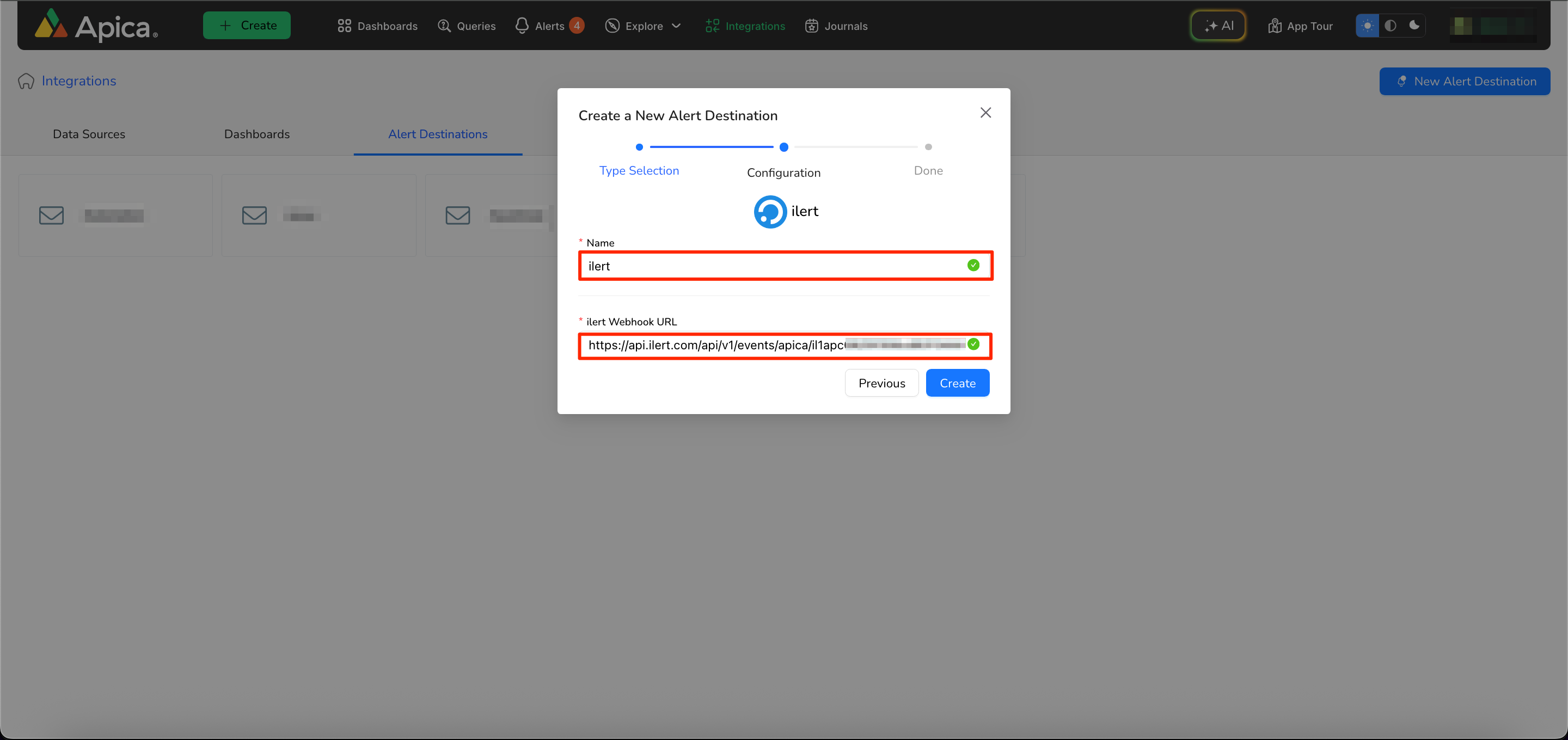
3. Enter a **Name** and the previously created Apica URL from the ilert alert source into the ilert Webhook **URL** field.

<figure><img src="https://2948796384-files.gitbook.io/~/files/v0/b/gitbook-x-prod.appspot.com/o/spaces%2F-LmzGprckLqwd5v6bs6m%2Fuploads%2FC575qwQnvJYKetd3enyy%2F9.png?alt=media&#x26;token=5fc7d629-002b-4998-ac91-b50f41cc9ee4" alt=""><figcaption></figcaption></figure>

4. Now on the top menu bar, click on **Alerts**.

<figure><img src="https://2948796384-files.gitbook.io/~/files/v0/b/gitbook-x-prod.appspot.com/o/spaces%2F-LmzGprckLqwd5v6bs6m%2Fuploads%2FLHQrnhxKPVkrBcVKAOuc%2F7.png?alt=media&#x26;token=646bf5ce-b93d-4772-9204-1beaa8dbbd86" alt=""><figcaption></figcaption></figure>

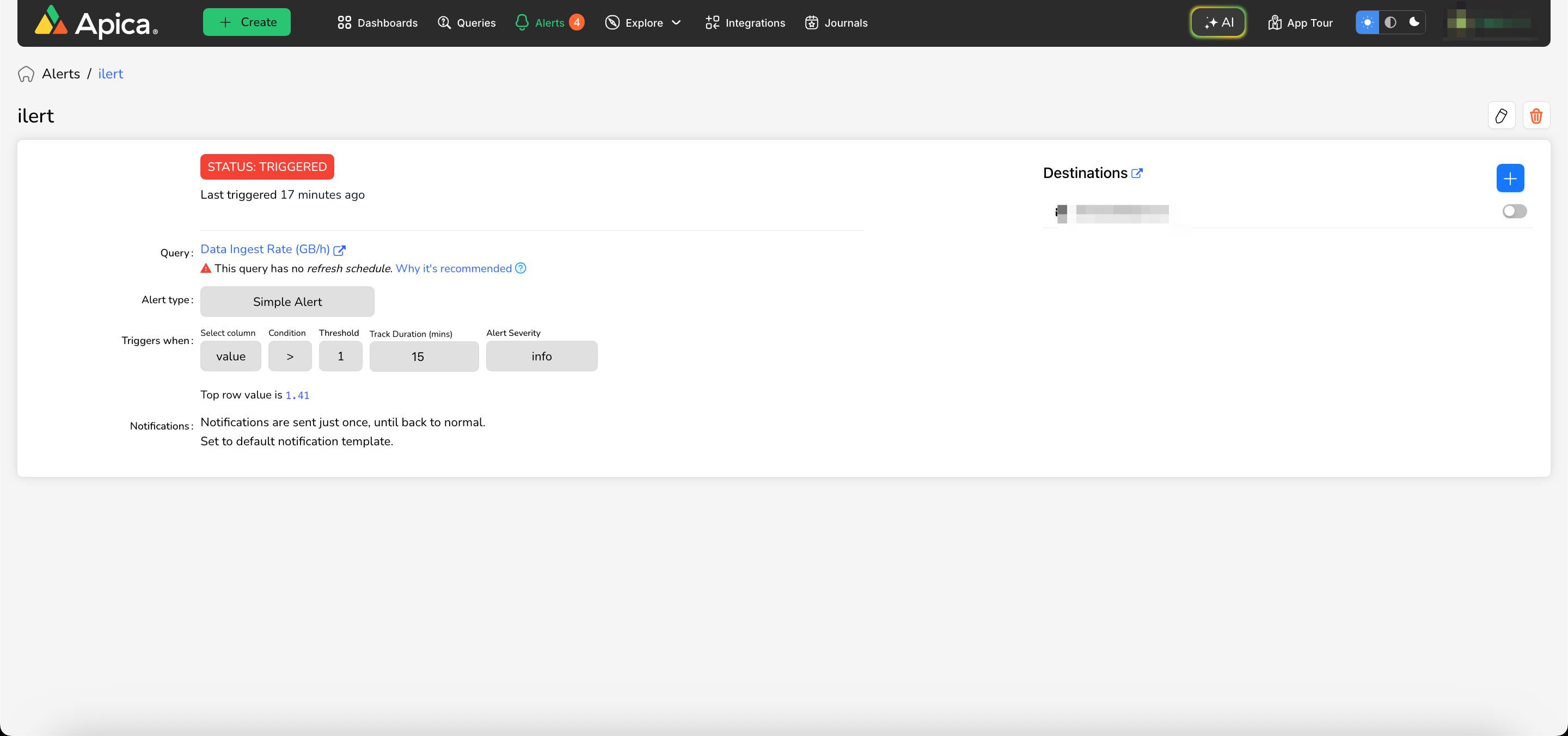
5. Select any Alert for which you want to receive a notification.
6. Click on the **'+'** in the Destinations tab.

<figure><img src="https://2948796384-files.gitbook.io/~/files/v0/b/gitbook-x-prod.appspot.com/o/spaces%2F-LmzGprckLqwd5v6bs6m%2Fuploads%2FyD93R8HV6fuPAZBBNiDL%2F4.png?alt=media&#x26;token=960dd77d-497c-4a21-a272-049e867328f1" alt=""><figcaption></figcaption></figure>

7. Now select the previously created **Alert Destination** and click on **Save**.

<figure><img src="https://2948796384-files.gitbook.io/~/files/v0/b/gitbook-x-prod.appspot.com/o/spaces%2F-LmzGprckLqwd5v6bs6m%2Fuploads%2FCp1B8QtWEKetGCu2W7fb%2F5.png?alt=media&#x26;token=25b85d1f-44a9-4234-89ef-92d5db3b48c8" alt=""><figcaption></figcaption></figure>

8. Once the alert is set up, you will see the alert destination in your list.

<figure><img src="https://2948796384-files.gitbook.io/~/files/v0/b/gitbook-x-prod.appspot.com/o/spaces%2F-LmzGprckLqwd5v6bs6m%2Fuploads%2Fhe2jKvHGsfc6gTopbK2f%2F6.png?alt=media&#x26;token=846e5468-0f79-4028-9309-d4afef7e08e7" alt=""><figcaption></figcaption></figure>

9. Once the **ilert integration** is complete and an **alert is created**, go to **ilert** to verify that the alert is working.

<figure><img src="https://2948796384-files.gitbook.io/~/files/v0/b/gitbook-x-prod.appspot.com/o/spaces%2F-LmzGprckLqwd5v6bs6m%2Fuploads%2FXAUdH6gfqZCYVQBYYpGU%2F8.png?alt=media&#x26;token=88b226cf-ed93-412e-882c-e586d7df75c0" alt=""><figcaption></figcaption></figure>

### FAQ <a href="#faq" id="faq"></a>

**Will alerts in ilert be resolved automatically?**

Yes, as soon as the alert transitions to the status "OK" within Ascent, all corresponding alert(s) in **ilert** will be resolved automatically.