> For the complete documentation index, see [llms.txt](https://docs.apica.io/llms.txt). Markdown versions of documentation pages are available by appending `.md` to page URLs; this page is available as [Markdown](https://docs.apica.io/platform-docs/test-data-orchestrator-tdo/user-documentation/tdo-project-builder-user-guide/business-rules/business-rule-sets.md).
# Business Rule Sets
Business rules can be saved to Business Rule Sets. This lets you save rules that may be used again and reload them quickly.
To save a set of business rules as a business rule set, go to the business rules page. In the upper right corner of the rules section, there are two icons - the 'reload' icon on the left and a 'save' disc icon on the right. To save the rules currently displayed, click the 'save' icon.
Biusiness Rules page
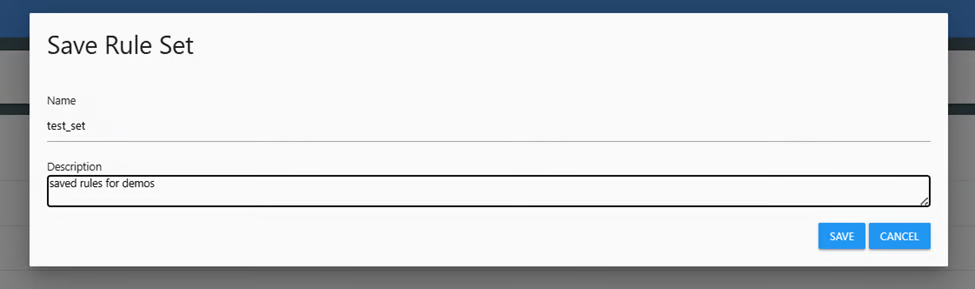
Once you click the icon, you'll be asked to give the rule set a name. You can also enter a free-form text description of the rule set. Click 'Save' to save the rule set.
Saving a rule set
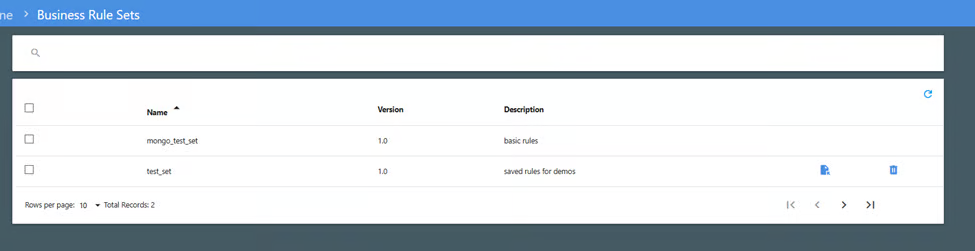
After the rule set is saved, it can be reloaded at any time by navigating to 'Business Rule Sets' on the menu, in the 'Coverage Engine' section of the menu. Hover over the rule set you want to restore to view the icons on the right. Click the first icon to reload the business rules.
Viewing saved rule sets
When you click the restore icon, you will be asked if you want to replace the existing business rules (the ones currently on the business rule page) with this set. Your options are 'Yes' (replace existing rules with this set), 'No' (add this set to the existing rules), or 'Cancel' (do not restore these rules).