> For the complete documentation index, see [llms.txt](https://docs.apica.io/llms.txt). Markdown versions of documentation pages are available by appending `.md` to page URLs; this page is available as [Markdown](https://docs.apica.io/platform-docs/test-data-orchestrator-tdo/user-documentation/tdo-project-builder-user-guide/determining-attributes/page-1/create-a-new-determining-attribute-from-an-existing-data-block.md).

# Create a New Determining Attribute from an Existing Data Block

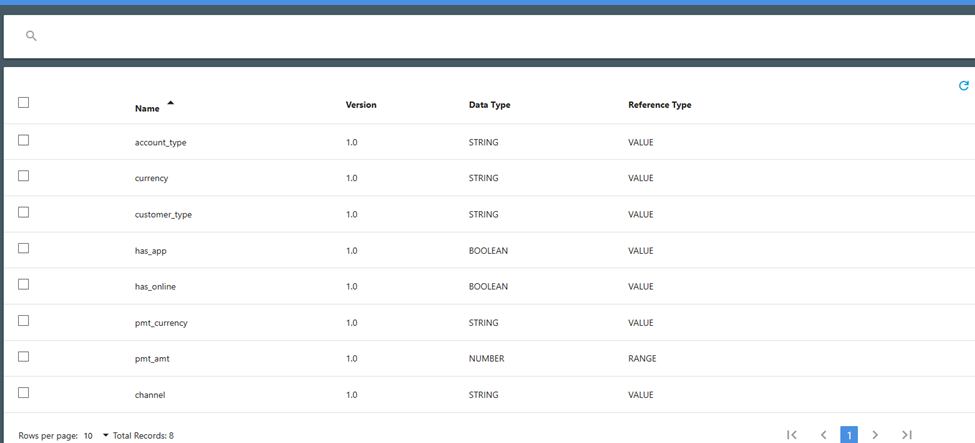
In some cases, you may need to create a determining attribute from an existing data block.  In the situation shown below, we have already used the ‘currency’ field from the ‘accounts’ data block to create the determining attribute for the account currency.  We still need to create a field for the payment currency value, but since the same currencies are supported for payments we can use the accounts data block as our source instead of manually typing them in.

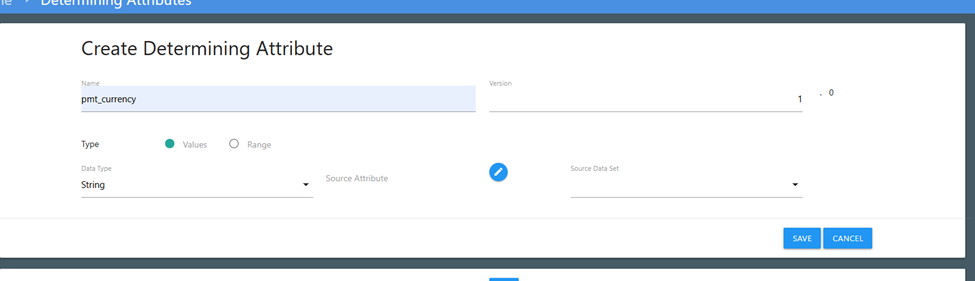
Open the ‘Create Determining Attributes’ window, name the attribute (pmt\_currency), and select ‘Values’ and ‘String' in the Types/Data Types section.  To the right of the ‘Data Types’ line is a header of ‘Source Attribute’ with a pencil icon.  Click on the pencil icon to open a data block selection window.

<figure><img src="/files/CTfwlqjpFAy5Cbw6z0qK" alt=""><figcaption><p>Create Determining Attribute window</p></figcaption></figure>

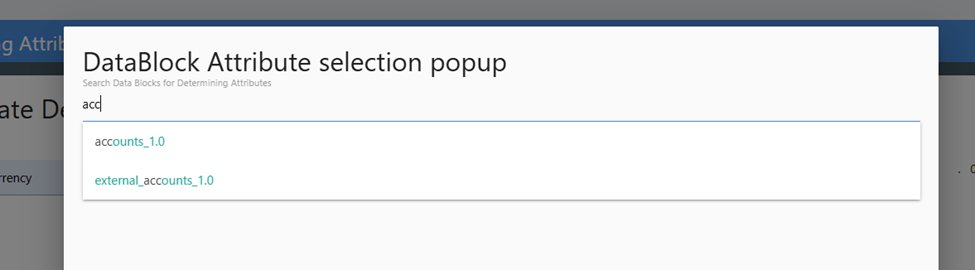
When the window pops up, start typing the data block name on the top line. TDO will search for files that match what you are typing. (You can type the full file name, or a partial name – which can be any portion of the file name – and TDO will find all matches for your entered value.) Once you see the list, select your data block. In this case, we want the ‘accounts’ data block. Click on that to open the attributes list.

<figure><img src="/files/7Wqa7shNetpjttkBAmzw" alt=""><figcaption><p>DataBlock Attribute selection popup window</p></figcaption></figure>

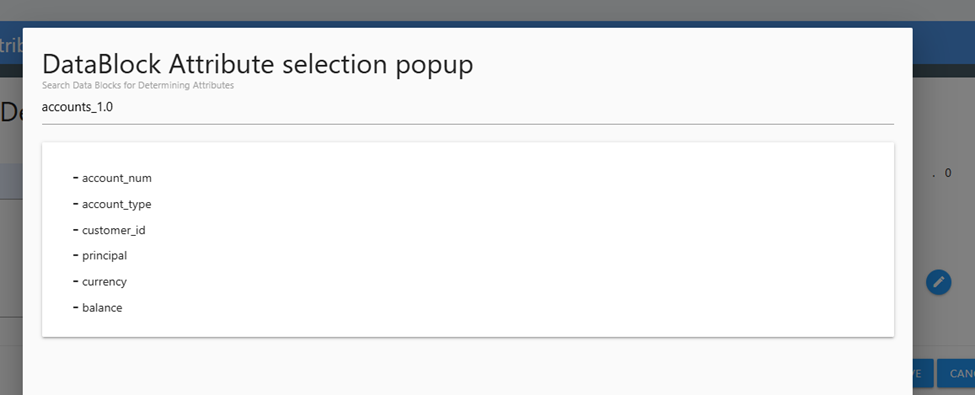
This will populate a list of all fields in the data block. Click on the field that contains the data values you want to use in the determining attribute. Here, we want to use the ‘currency’ field.

<figure><img src="/files/vy1wclIV3u8tb0rgsOio" alt=""><figcaption><p>List of fields to select from the DataBlokc Attribute selection popup</p></figcaption></figure>

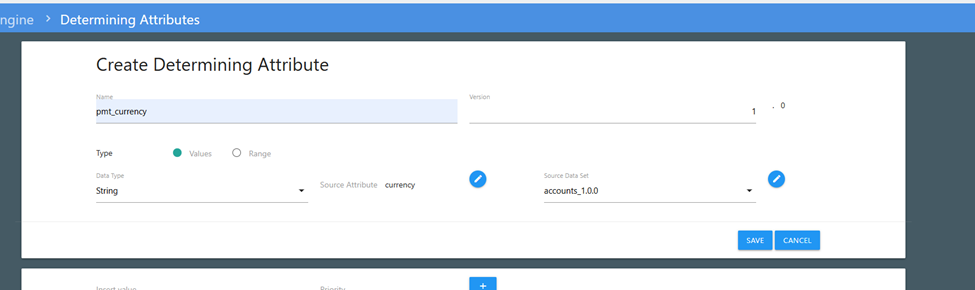
When you click on the desired field name, this will close the popups and show the selected values in the 'Create Determing Attribute' window. Click on the pencil to the right of the ‘Source Data Set’ field to see the list of available unique values in the selected field.

<figure><img src="/files/7CuTY6piKIilsXBU7vuF" alt=""><figcaption><p>Pencil to right of screen ('Source Data Set') to select values</p></figcaption></figure>

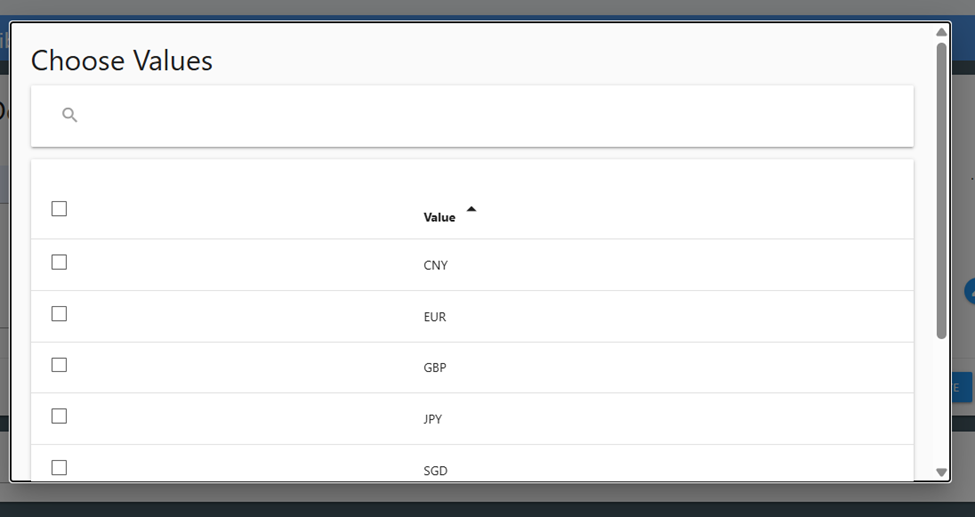
This opens a ‘Choose Values’ popup with all unique values found in the selected field. You can select all of the values by clicking the check box on the top line, or can select only certain values by checking them off individually.

<figure><img src="/files/IlxFA8t0esaLcUyNxrAF" alt=""><figcaption><p>Choose Values window</p></figcaption></figure>

Once you’ve identified the values you want in your attribute (here, we want them all so the top box was checked) scroll down to the bottom of the pop up window and click ‘Save’.&#x20;

Once you’ve completed these actions, you can now see all of your determining attributes in the Determining Attributes list.

<figure><img src="/files/iJCFAMBRIlt4uxxZ9x0u" alt=""><figcaption><p>pmt_currency Determining Attribute in list</p></figcaption></figure>


---

# Agent Instructions
This documentation is published with GitBook. GitBook is the documentation platform designed so that both humans and AI agents can read, navigate, and reason over technical content effectively. Learn more at gitbook.com.

## Querying This Documentation
If you need additional information that is not directly available in this page, you can query the documentation dynamically by asking a question.

Perform an HTTP GET request on the current page URL with the `ask` query parameter, and the optional `goal` query parameter:

```
GET https://docs.apica.io/platform-docs/test-data-orchestrator-tdo/user-documentation/tdo-project-builder-user-guide/determining-attributes/page-1/create-a-new-determining-attribute-from-an-existing-data-block.md?ask=<question>&goal=<endgoal>
```

`ask` is the immediate question: it should be specific, self-contained, and written in natural language.
`goal` is optional and describes the broader end goal you are ultimately trying to accomplish on behalf of the user. GitBook uses it to tailor the answer towards what is most useful for that goal.

The response will contain a direct answer to the question and relevant excerpts and sources from the documentation.

Use this mechanism when the answer is not explicitly present in the current page, you need clarification or additional context, or you want to retrieve related documentation sections.