> For the complete documentation index, see [llms.txt](https://docs.apica.io/llms.txt). Markdown versions of documentation pages are available by appending `.md` to page URLs; this page is available as [Markdown](https://docs.apica.io/platform-docs/test-data-orchestrator-tdo/user-documentation/format-function-guide.md).
# Format Function Guide
{% hint style="info" %}
Test Data Orchestrator (TDO) has been re-branded to Wayfinder as of Q1 2026. These documents are currently being re-written to reflect that change. Test Data Orchestrator / TDO / Wayfinder all refer to the same product throughout these documents.
{% endhint %}
#### Overview
In the assignment rules process in TDO, you can use format functions to create data or format data in specific outputs. These functions support numbers, strings, and dates. You can also create randomly generated numbers or dates, in a specific format, within a specified range.
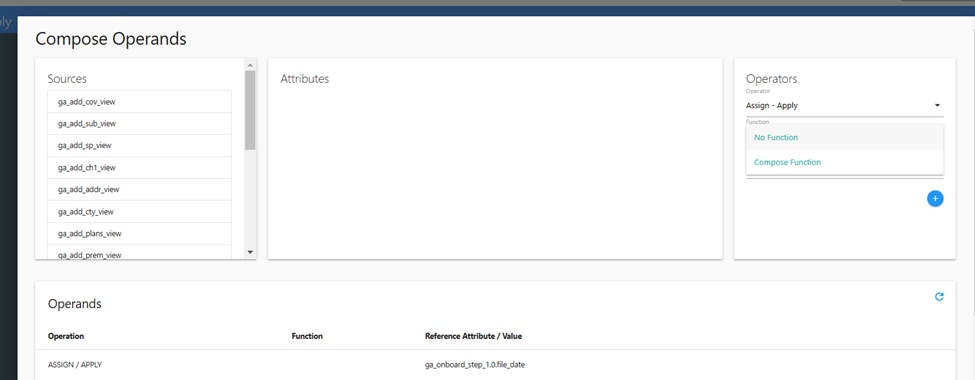
When using these functions, you must select ‘Compose Function’ from the drop-down menu in the ‘Operands’ section of the 'Compose Operands' window (accessed during the 'assignment rules' process).
Compose Operands window
If you fail to select ‘Compose Function’ the output generated will be the format function string and not an assigned value.
#### Syntax
The format function contains a marker, a format, and \[optional] the data to be processed. These sections are separated by pipes ( | ). The layout is %\|\|\ . For a date format function, %D|YYYYMMdd|09/01/2024 would output 20240901.
In the case of date formats, if the optional data is omitted, the output would be the current date. %D|YYYYMMdd would output the current date in the format specified.
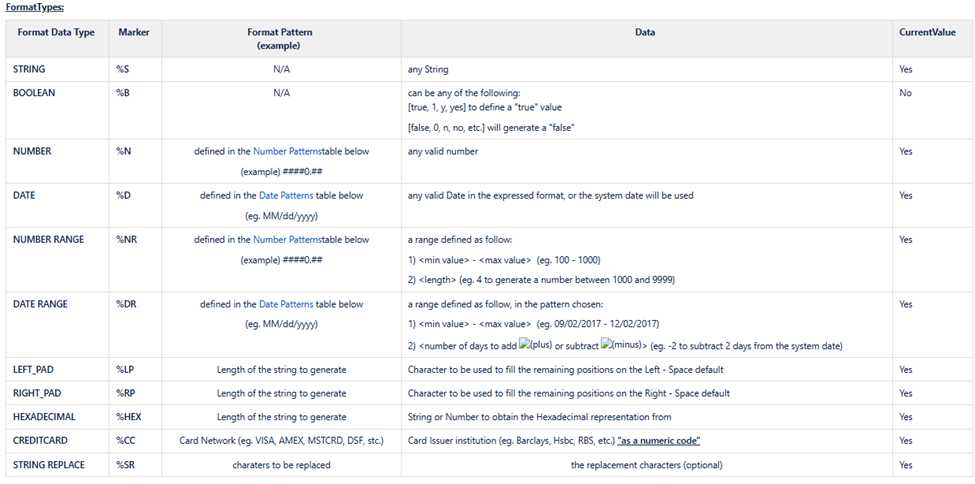
#### Supported Format Types
The table below shows the supported format types and the marker(s) associated with those format types.